Pycharm实现python远程调试

LittleYou Don't Know
10月 19, 2016
- 在远程客户端[linux]安装pycharm-debug.egg 首先,下载安装easy_install的安装脚本12#wget https://bootstrap.pypa.io/ez_setup.py#python ez_setup.py
pycharm-debug.egg文件在Pycharm安装目录下的debug-eggs文件夹中1#easy_install pycharm-debug.egg
类似地,在服务端[Windows]中安装pycharm-debug.egg12>python ez_setup.py>easy_install.exe pycharm.egg
- 在Pycharm中配置Remote Debug Edit Configuration->+>Python Remote remote_debug
Local host name 填写Windows服务端IP
Port 填写任意未被占用端口
- 测试:在客户端python脚本中添加如下1234567891011121314#vim remote.py#!/usr/bin/env pythonimport pydevddef debugtest():pydevd.settrace('192.168.22.148', port=9901, stdoutToServer=True, stderrToServer=True)a = 10b = 20c = a + bprint cif __name__ == "__main__":debugtest()
最后,打开自定义的Remote debug,并在客户端执行该脚本文件 可以看到如下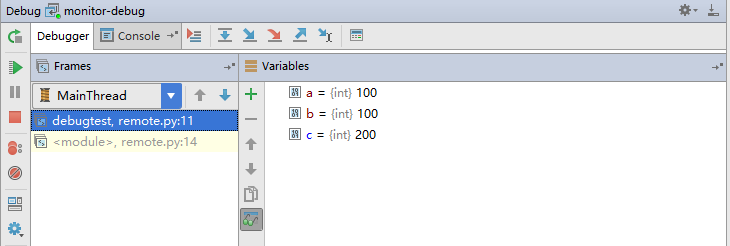
PS:客户端无法Ping通Windows时,在防火墙->高级->入站规则 中启用ICMP